
Sections Assisted Review Algorithm and Methodology
Manual informationAssisted Review Algorithm and Methodology
1.1 | August 11, 2021 | Rebranded adhering to the latest Conduent brand central documentation standards/guidelines. | Technical Writer
Document conventions
Convention | Explanation |
|---|---|
Bold | For file names, commands, fields, menus, options, and window names. |
Courier New | Commands as you should type them. |
Lucida Console | Example output generated by the system. |
Italics | For configuration variables, including variable portions of file names and URLs. Also indicates a document name. |
Note / Blue Callout | The Blue Callout text indicates information that is of special interest or importance, an idea that could be useful or additional information about a product or a feature. |
| The Caution icon along with the text indicates actions that can lead to problems in system operation or configuration settings if the instructions are not followed properly. |

Revision history
This section tracks the initial creation of the document after each major version thereafter.
Ver: | Date | Description | Reviewed / Approved By |
|---|---|---|---|
1.0 | Jun 4, 2014 | Initial Version | Team |
1.1 | August 11, 2021 | Rebranded adhering to the latest Conduent brand central documentation standards/guidelines. | Technical Writer |
Assisted Review Algorithm and Methodology#
Viewpoint Assisted Review (VAR) facilitates cut cost and time by automating review for document prioritization, QC enhancement or wholesale binary review. Viewpoint Assisted Review offers several distinct advantages over competitive solutions including the ability to:
- Leverage it alongside Viewpoint’s analytical tools to build the most efficient ‘seed’ set and drive the most accurate review results.
- Utilize it in combination with traditional culling techniques to further minimize the review population in a defensible manner.
- Isolate the most highly relevant documents for ECA purposes in order to understand facts of the case early in the matter.
Algorithm#
VAR utilizes Probabilistic Latent Sematic Analysis[1] (PLSA), an advanced machine learning algorithm, to learn from a human-reviewed representative set of sample documents in order to assist with the automatic classification of an un-reviewed corpus of documents. The Viewpoint Assisted Review process consists of two parts such as building a model based on a reviewed set of documents (Seed Set) and applying the model to the set of documents that the user wants to classify (Target View). For a detailed description of the workflow, refer the Viewpoint Assisted Review Manual.
Building the Model#
Viewpoint uses PLSA with two binary points based on the human tagging of the Seed Set. Using the Seed Set, VAR will build two corpora (list of the words per document), one with positive documents, and the other with negative documents. Viewpoint will take both corpuses and create a single matrix N[d,w] where d is the document index, w is the word index and the value is the count of this word (w) in document (d).
For example, for two documents with text ‘hello sad, sad world’ (negative) and ‘hello, world’ (positive) you will end up with the following matrix:
1 | 2 | 1 |
|---|---|---|
1 | 0 | 1 |
If the option to use term frequency–inverse document frequency[2] (“TF-IDF”) weighting is ON, it will be applied to N[d, w] matrix after initial matrix has been populated by the system.
After that, VAR builds an intermediate probability matrix P[w, c], where w is word number and c is category index (positive 1 and negative 0) using formula:
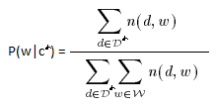
The value of P [w, c] will be probability of word w appear in category c. In a case of documents above, P will look like:
W | positive | negative |
|---|---|---|
1 (hello) | 0.5 | 0.25 |
2 (world) | 0.5 | 0.25 |
3 (sad) | 0 | 0.5 |
The matrix P saved to database to be used later in classification part.
Classification#
At the beginning of classification stage, Viewpoint extracts a list of unique words from a document and will compare that list against the list of words contained in the model. If there are no known words found, document will be classified with “No token match in corpora” error. If there are matches, the system will apply the Expectation Maximization algorithm[3] (“EM-algorithm”) to derive the probability score:
- Create a matrix N (w), where w is word count in the model, and N [w] count of word w in the document to be classified. For a document containing the text “Hello fun, fun world”, the result will be:
1 (hello) |
|---|
1 (world) |
0 (sad) |
You will see that “sad” receives a value of 0, as the word “sad” exists in the model matrix built in the “Building the Model” section earlier in this document but does not exist in the text of the document to be classified. Additionally, the word “fun” does not appear in the matrix N (w) because the word does not exist in the text used to build the model matrix.
- Apply the EM-algorithm, which in a simple form can be described as:
x[n+1] = f(y[n]) (E step)
y[n+1] = g(x[n+1]) (M step)
Where f() & g() represent further functions[4], matrix x[ ] is the intermediate results, and matrix y[ ] is the probability of belonging to one of the categories. This algorithm will run in a loop until the probability score has stabilized (log likelihood, calculated as:
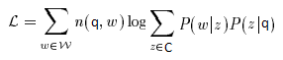
And score difference between iterations is less than 0.00001). In our example, it would take 14 iterations to complete. The resulting probability of belonging to the positive category will be “0.99997824383263323”.
The classification process described above will be applied to all documents in the Target View, excepting those that did not meet token/text requirements.
The original article describing PLSA is available at http://cs.brown.edu/~th/papers/Hofmann-SIGIR99.pdf ↑
http://en.wikipedia.org/wiki/Expectation–maximization_algorithm ↑
Ibid. ↑