
Sections Data Inventory Report (Processing)
Manual informationData Inventory Report (Processing)
1.0 | March 29, 2022 | Initial Version | Viewpoint Team
Document conventions
Convention | Explanation |
|---|---|
Bold | For file names, commands, fields, menus, options, and window names. |
Courier New | Commands as you should type them. |
Lucida Console | Example output generated by the system. |
Italics | For configuration variables, including variable portions of file names and URLs. Also indicates a document name. |
Note / Blue Callout | The Blue Callout text indicates information that is of special interest or importance, an idea that could be useful or additional information about a product or a feature. |
| The Caution icon along with the text indicates actions that can lead to problems in system operation or configuration settings if the instructions are not followed properly. |

Revision history
This section tracks the initial creation of the document after each major version thereafter.
Ver: | Date | Description | Reviewed / Approved By |
|---|---|---|---|
1.0 | March 29, 2022 | Initial Version | Viewpoint Team |
Report Glossary#
Actual Files: All files, including archives. The size on disk according to the file system. Note that this size does not take into account empty block space (extra space used by the file system to store files).
Archive: A file which contains other files. An archive could be a ZIP file, a PST (Outlook mailbox), etc.
Billable Files: All files derived from an archive but not the archive file itself.
Extracted Files: Files which are extracted from container files during Processing. For example files which reside in a ZIP archive can be extracted by Viewpoint Processing and are considered Extracted files.
Imported / Ingested: Imported / ingested data is data imported using Viewpoint’s Import feature. Imported data is typically already processed by another party. For example, a “text and TIFF” import, where the Native files were processed by another party but only the text and TIFFs were made available to Viewpoint. For the purposes of the Data Inventory Report, if a Document originated in Processing it is considered Processed data – even if data in overlayed with an Import.
Processed: Data which has been processed by Viewpoint Processing – cataloged, staged, TIFFed, extracted, etc.
Filtered Files: Documents may be filtered in Viewpoint in the following manners: Deletion, Ignored (intentionally not posted to Review), or culled with the Viewpoint Early Filter functionality.
Data Inventory (Processing)#
Report of document counts, file counts and file sizes in Viewpoint Processing. Values in this report are different than the values in the Review version of the Data Inventory report.
Legend:#
All file sizes are in Gigabytes
All dates are in UTC
Header:#

Ingested (Part 1): #
A summary of Document and File counts / sizes in Imported Medias (as opposed to Processed Medias)
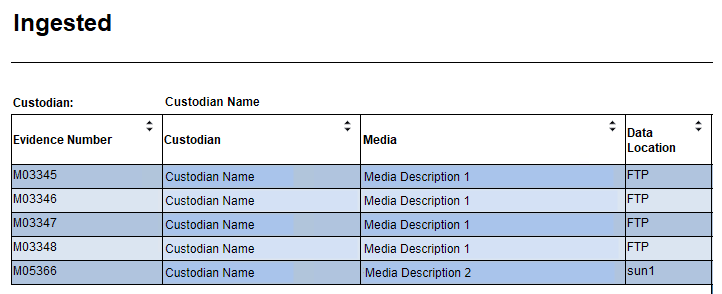
Evidence Number: Evidence number of the Media. The Evidence Number is the letter “M” followed by the Media ID. If there is a Parent Media the Parent Media’s Media ID will be prepended (also with a leading “M”).
Custodian: Name of the Custodian –the data’s original owner.
Media: Description of the Media.
Data Location: Viewpoint Data Location. Descriptor of how a set of data was received (FTP, HDD, Thumb Drive, etc.).
Ingested (Part 2):#
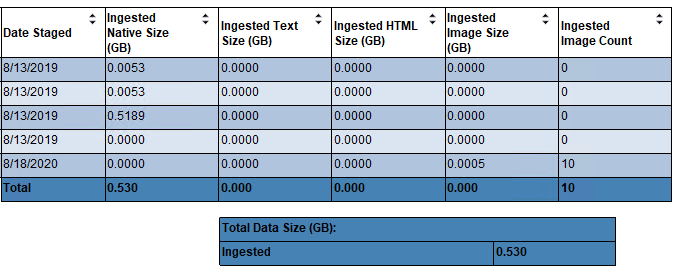
Date Staged: Date of when the Media was last staged.
Ingested Native Size (GB): Size, in Gigabytes, of all ingested Native files.
Ingested Text Size (GB): Size, in Gigabytes, of all ingested Text files.
Ingested HTML Size (GB): Size, in Gigabytes, of all ingested HTML files.
Ingested Image Size (GB): Size, in Gigabytes, of all Image files at the point of Import. Specifically, the original image files from a 3rd party, not the final size of image files in the Viewpoint file store. Only considers the last successful import for each Document (if a Document was imported multiple times, only the quantity from the last successful Import is considered).
Ingested Image Count: Count of imported Image files (individual imported file count, not overall Document count). Only considers the last successful import for each Document (if a Document was imported multiple times, only the quantity from the last successful Import is considered).
Processed (Part 1):#
A summary of Document and File counts / sizes in Processed Medias (as opposed to Imported Medias)
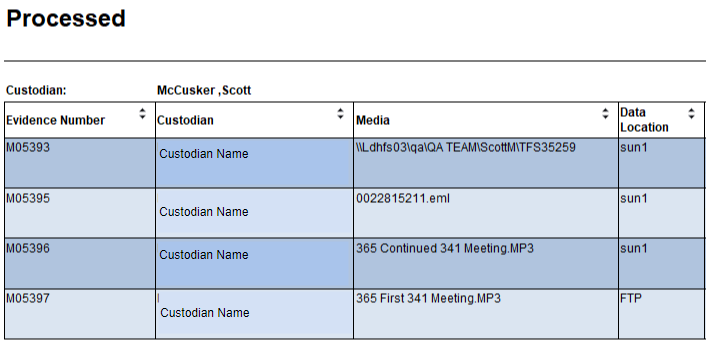
Evidence Number: Evidence number of the Media. The Evidence Number is the letter “M” followed by the Media ID. If there is a Parent Media the Parent Media’s Media ID will be prepended (also with a leading “M”).
Custodian: Viewpoint Custodian. Descriptor of who a processed set of data belongs to.
Media: Description of the Media.
Data Location: Viewpoint Data Location. Descriptor of how a set of data was received (FTP, HDD, Thumb Drive, etc.).
Media Path: The value in Media.MediaSourceFolderPath. If this is an EFile Media, this is the file path where the data came from. Otherwise this is blank. For example, if this is an email-archive generated Media.
Processed (Part 2):#
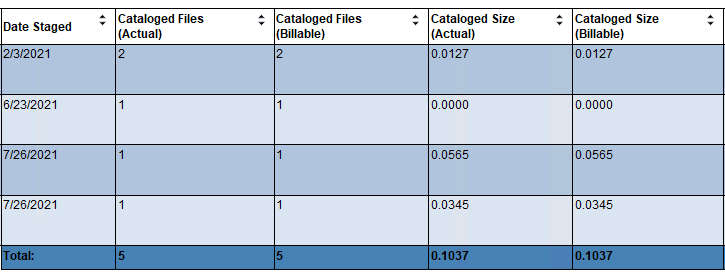
Date Staged: UTC date of when the Media was last staged.
Cataloged Files (Actual): Count of all cataloged Native files – does not include Imported files.
Cataloged Files (Billable): Count of billable cataloged Native files – does not include Imported files.
Cataloged Size (Actual): Size, in Gigabytes, of all cataloged Native files – does not include Imported files.
Cataloged Size (Billable): Size, in Gigabytes, of billable cataloged Native files – does not include Imported files.
Processed (Part 3):#
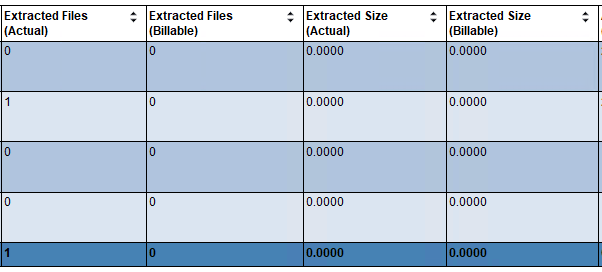
Extracted Files (Actual): Count of all extracted Native files – does not include Imported files.
Extracted Files (Billable): Number of billable extracted Native files – does not include Imported files.
Extracted Size (Actual): Size, in Gigabytes, of all extracted Native files – does not include Imported files.
Extracted Size (Billable): Size, in Gigabytes, of all extracted billable Native files – does not include Imported files.
Processed (Part 4):#
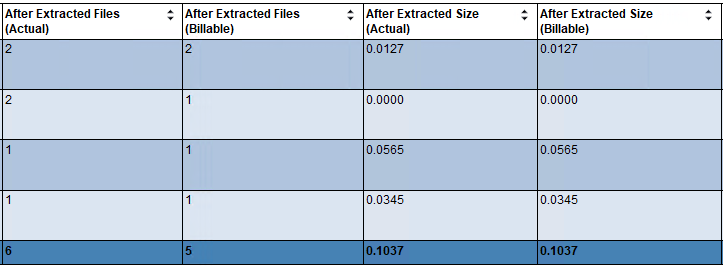
After Extracted Files (Actual): Calculated: Cataloged Files (Actual) + Extracted Files (Actual).
After Extracted Files (Billable): Calculated: Cataloged Files (Billable) + Extracted Files (Billable).
After Extracted Size (Actual): Calculated: Cataloged Size (Actual) + Extracted Size (Actual).
After Extracted Size (Billable): Calculated: Cataloged Size (Billable) + Extracted Size (Billable).
Processed (Part 5):#
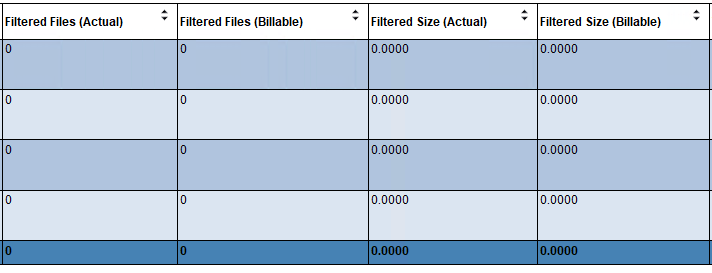
Filtered Files (Actual): Number of all filtered Native files – does not include Imported files.
Filtered Files (Billable): Number of all billable filtered Native files – does not include Imported files.
Filtered Size (Actual): Size, in Gigabytes, of all filtered Native files – does not include Imported files
Filtered Size (Billable): Size, in Gigabytes, of all billable filtered Native files – does not include Imported files
Processed (Part 6):#
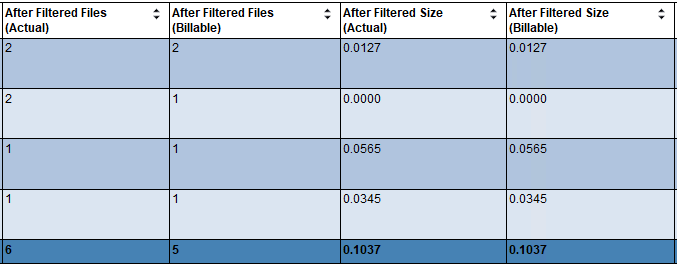
After Filtered Files (Actual): Count of all cataloged and extracted Documents – does not include Filtered or Imported Documents.
After Filtered Files (Billable): Count of all cataloged and extracted Documents – does not include Filtered, Archived or Imported Documents.
After Filtered Size (Actual): Size, in Gigabytes, of all cataloged and extracted Documents – does not include Filtered or Imported Documents.
After Filtered Size (Billable): Size, in Gigabytes, of all cataloged and extracted Documents – does not include Filtered, Archived or Imported Documents.
Processed (Part 7):#
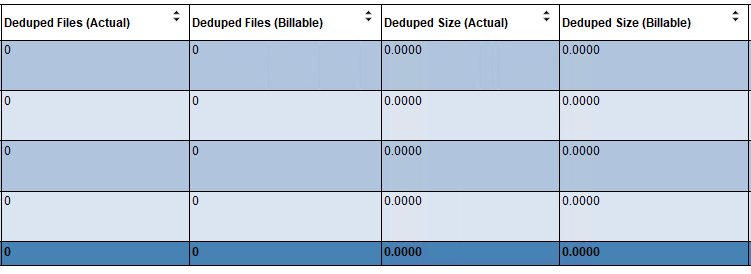
Deduped Files (Actual): Count of all deduped Native files – does not include Imported files.
Deduped Files (Billable): Count of billable deduped Native files – does not include Imported files.
Deduped Size (Actual): Size, in Gigabytes, of all deduped Native files – does not include Imported files.
Deduped Size (Billable): Size, in Gigabytes, of all deduped billable Native files – does not include Imported files.
Processed (Part 8):#
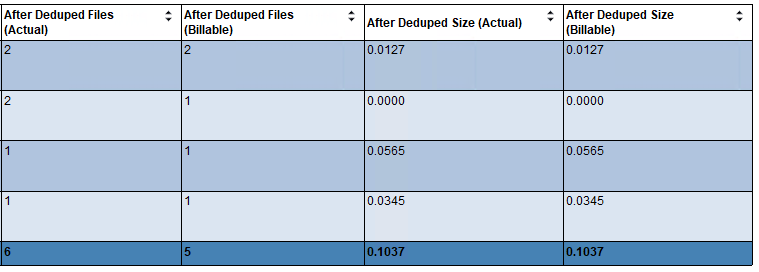
After Deduped Files (Actual): Calculated:
Cataloged Files (Actual) + Extracted Files (Actual)
- Filtered Files (Actual) - Deduped Files (Actual)
After Deduped Files (Billable): Calculated:
Cataloged Files (Billable) + Extracted Files (Billable)
- Filtered Files (Billable) - Deduped Files (Billable)
After Deduped Size (Actual): Calculated:
Cataloged Size (Actual) + Extracted Size (Actual)
- Filtered Size (Actual) - Deduped Size (Actual)
After Deduped Size (Billable): Calculated:
Cataloged Size (Billable) + Extracted Size (Billable)
- Filtered Size (Billable) - Deduped Size (Billable)