
Sections Data Workflow and Management
Manual informationData Workflow and Management
1.1 | August 10, 2021 | Rebranded adhering to the latest Conduent brand central documentation standards/guidelines. | Technical Writer
Document conventions
Convention | Explanation |
|---|---|
Bold | For file names, commands, fields, menus, options, and window names. |
Courier New | Commands as you should type them. |
Lucida Console | Example output generated by the system. |
Italics | For configuration variables, including variable portions of file names and URLs. Also indicates a document name. |
Note / Blue Callout | The Blue Callout text indicates information that is of special interest or importance, an idea that could be useful or additional information about a product or a feature. |
| The Caution icon along with the text indicates actions that can lead to problems in system operation or configuration settings if the instructions are not followed properly. |

Revision history
This section tracks the initial creation of the document after each major version thereafter.
Ver: | Date | Description | Reviewed / Approved By |
|---|---|---|---|
1.0 | Jun 2, 2015 | Initial Version | Team |
1.1 | August 10, 2021 | Rebranded adhering to the latest Conduent brand central documentation standards/guidelines. | Technical Writer |
Data Workflow#
The ViewpointTM e-Discovery Platform consists of two software modules that are fully integrated for complete functionality across the following key stages of the EDRM:
- ViewpointTM Processing
- ViewpointTM Review
- ViewpointTM Analysis
- ViewpointTM Production
The following is a summary of the primary stages of the data workflow throughout the system.
Typical Viewpoint Workflow#
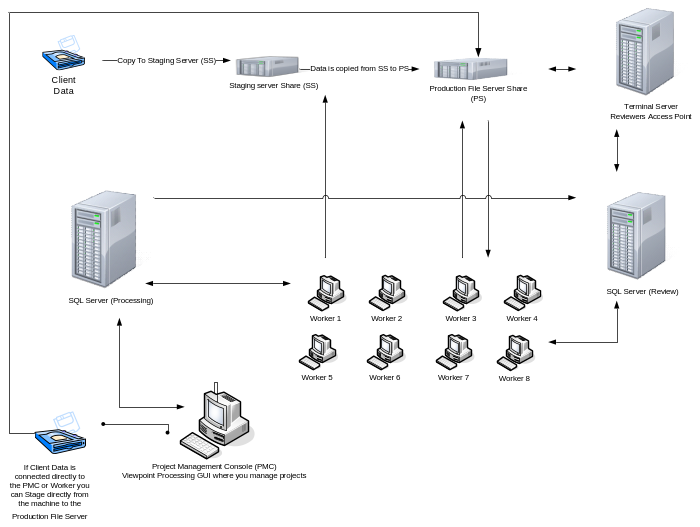
- Client Data – Data is received on a hard drive, DVD, FTP site, etc.
- Staging Server - Data is copied to interim storage server to consolidate data and speed file transfer. This step may be skipped if client data may be write-protected to ensure no spoliation.
- The Project Manager accesses the specific project from the Processing Application which functions as a master console for all processing functions. Data is mapped from the staging server and directed to the Production File Server (PFS). The PFS will function as the primary location for all files to reside throughout the project.
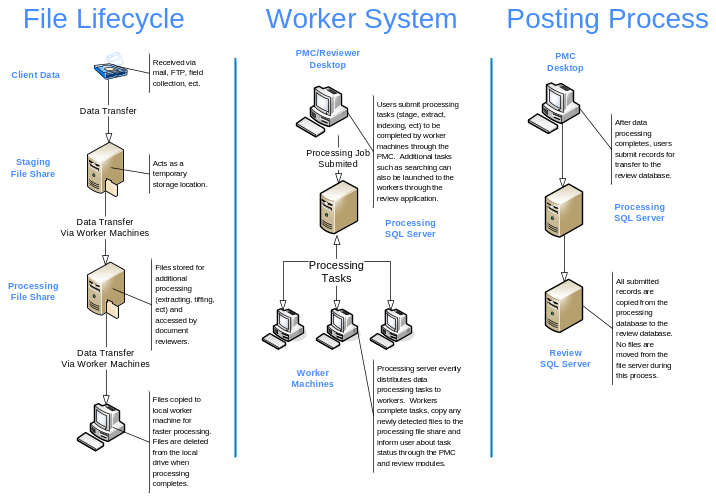
- When executing the Staging function, Viewpoint begins creating numerous jobs which are managed through the SQL Server. Each job is made available through workflow processes to enable the Worker stations to begin processing. Each Worker is notified that jobs are available and each are assigned tasks that they ‘pick up’ dynamically. The first primary function is to copy the data from the Staging Server to the user-selected project folder located on the PFS. The copy-process is fully distributed to all Workers allowing the file transfer to happen in parallel at very high-speeds. The SQL database is automatically updated with path/file information to access each data object in the future. In this manner, numerous steps are managed systematically, efficiently and at maximum speeds.
- Once the data is staged, processing of the files may begin. Numerous workflows are launched simultaneously from the Processing Application and the workers ‘pick up’ their job assignments (managed by SQL workflows). For example, if a PST is being processed, a worker is assigned the file in which it copies the PST file from PFS to the worker. As the PST begins to extract various data objects (msg files, attachments, etc.) each object is registered in the SQL database and written out to the PFS. At this point, another workflow is created for each object so they may be independently processed on another worker. In this manner, all Workers are fully utilized at every juncture and bottlenecks are avoided.
- Once processing completes the data is de-duplicated, then indexed. Indexing of all textual content is fully distributed across all allocated Workers through dtSearch allowing indexing to occur in parallel across available resources.
- Upon completion of all Processing functions, data may then be “Posted” to the Viewpoint Review SQL server to allow users to begin review of documents. The Posting process creates a duplicated SQL table on the Review SQL Server and transfers the relevant metadata for review. There is no need to copy files or import/export as the SQL environment as the Viewpoint application was developed with fully integrated processes between Processing and Review. Each SQL table simply points to the same files on the PFS.
- Reviewers can access the Review Platform by two methods:
- Access from the Internet – Terminal Server
- Terminal Server access to the Review SQL DB and Production File Server
- Access internally from the LAN – Personal Computer (or Laptop)
- Reviewer access to the Review SQL Server and Production File Server
Data Management and Reduction Opportunities#
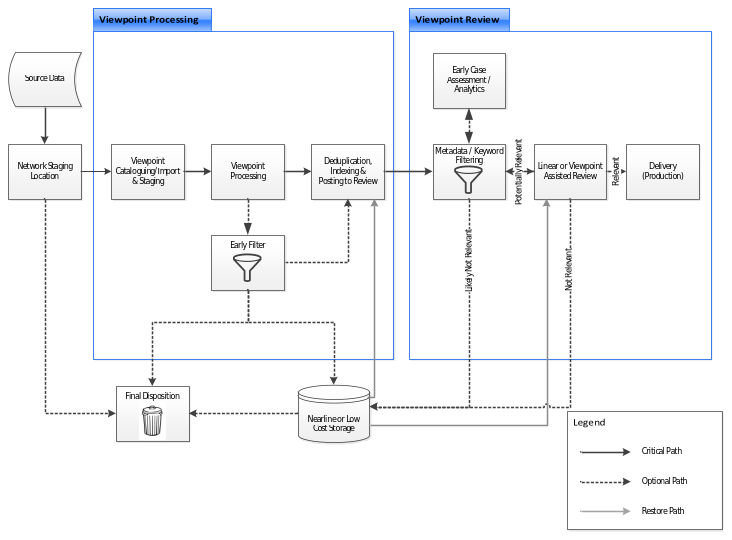
Viewpoint provides multiple opportunities to reduce data volumes throughout the project lifecycle. Data may either be deleted or moved to archival/low cost storage, as required. Typical opportunities to reduce hosted data volumes are illustrated in the following flow chart:
Reduction Opportunities#
- Temporary Data Staging: Once data has been catalogued and staged into Viewpoint, it is not necessary for data to remain in the temporary staging location.
- Early Filter: Viewpoint Processing allows data culling within processing based on file metadata and keyword searching. Files filtered during Early Filtering will be marked ‘ignored’ and can either be moved or deleted using the provided Maintenance Scripts.
- View Manager Culling & Filtering: Data volumes may be further reduced through the application of various search criteria in the Viewpoint Review View Manager module. Files identified as likely not relevant may be added to a View for further migration or removal, as required.
- Review Culling: Documents identified as not relevant during ECA, Linear, or Assisted Review may be added to a View for further migration or removal, as required.
Refer to the Viewpoint Processing Manual for more information on the data migration and removal Maintenance Scripts.